
A Practical Feature Map
3 Patti Pearl presents a familiar Teen Patti style entertainment package: account access, a lobby for finding tables or modes, classic three-card hand play, bonus panels, optional progression systems, and event entries that rotate over time. Exact names and layouts shift between versions, so treat this as a map of feature categories rather than a frozen screenshot tour.
Knowing categories helps you navigate updates without panic. When an icon moves, you still recognize whether you are looking at rewards, settings, seating, or account care. That recognition reduces support anxiety and misclicks.
Feature availability can depend on app version, region configuration, and ongoing events. In-app labels beat outdated social media tours.
Accounts and Profiles
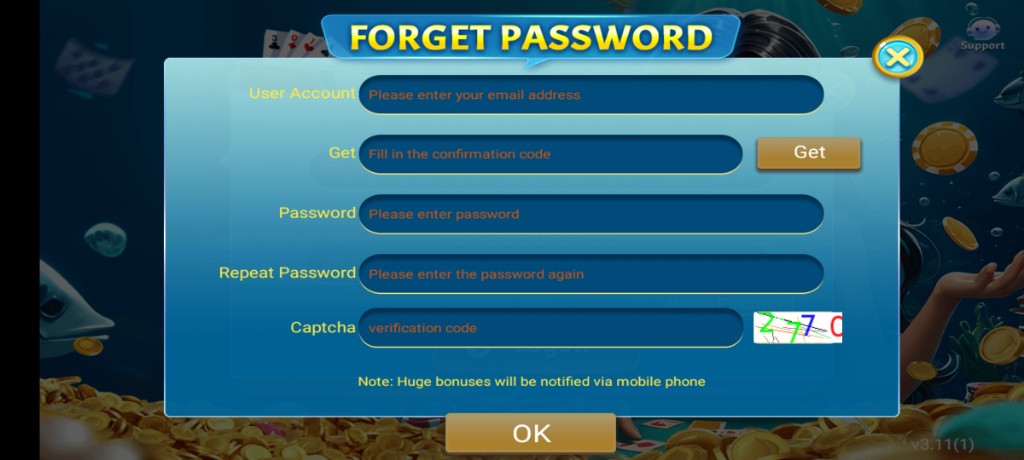
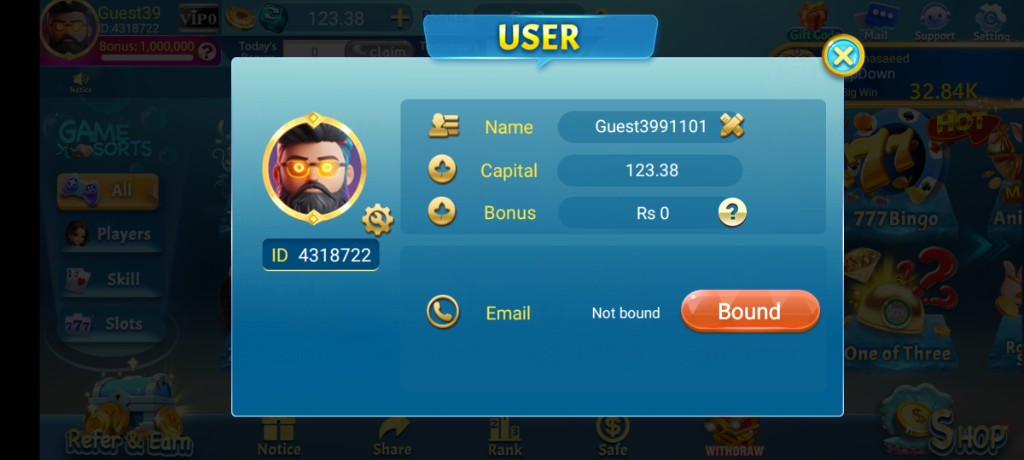
Account features cover registration or guest entry, login, profile display, and often a path to link progress more permanently. Profile spaces may let you set an avatar or view basic stats. The important habit is linking before you switch phones so progress is not stranded.
Settings related to sound, language, and notifications usually live near the profile or gear icon. Spend a minute there on first launch. A quieter notification setup can improve focus during longer sessions without touching any competitive rules.
- Login and recovery options
- Profile identity basics
- Sound and notification controls
- Permission prompts tied to device features
- Session stability on trusted networks
Lobby and Table Access
The lobby is the traffic circle of the app. From here you choose stakes or modes appropriate to your chip buffer, enter queued seating, and see banners for limited events. Healthy lobby use means picking tables you can afford emotionally and financially in chips, not the highest number that flashes.
Search or filter controls, when present, help you avoid chaotic hopping. Hopping tables every hand trains impatience. Pick a seat, observe a few deals, then decide whether the texture fits your mood.
| Lobby element | Player job | Healthy habit |
|---|---|---|
| Mode/stake list | Choose a fit for your buffer | Avoid ego seats |
| Banners | Notice limited events | Read rules before tapping |
| Inventory/chips display | Know your runway | Stop at a planned floor |
| Friends or social entry | Optional connection | Keep privacy defaults sane |
Core Card Play Features
At the table you will find the classic actions associated with Teen Patti style play: seeing cards according to rules, packing, calling or matching stakes as the mode requires, and resolving hands by ranking. Tutorials or help panels, when included, are worth one slow read even if you already played offline cards with family.
Timers exist to keep games moving. When your connection is weak, timers feel harsher. That is another reason network readiness is part of enjoying features, not a separate chore. Animations that show wins and losses are cosmetic; they do not change the need for responsible pacing.
- Learn hand rankings from the in-app help if available
- Watch a few hands before forcing big commitments
- Respect timers instead of multitasking away mid-decision
- Use mute options if chat distracts you
- Leave tables when focus drops instead of autopiloting
Fair Session Tools
Some builds expose history snippets, hand reviews, or basic statistics. Use them to learn, not to fuel conspiracy thinking after every loss. Variance creates streaks. Features that show history are mirrors, not prosecutors.
Bonuses and Events
Bonus features often include daily claims, promotional mail, limited spins, and seasonal events. They exist to add variety. They work best when you claim them on a stable connection and then return to your planned session length. Chasing every banner can turn a thirty-minute break into an unfocused two-hour wander.
Event centers may list tasks or timers. Read completion rules before grinding. If a task conflicts with your budget, skip it. Skipped promotions are not moral failures; they are prioritization.
| Bonus type | Good use | Poor use |
|---|---|---|
| Daily claim | Collect once on Wi‑Fi | Relaunch ten times obsessively |
| Limited spin | Use attempts, verify rewards | Install mod menus |
| Event tasks | Pick affordable goals | Overspend chips to force completion |
| Inbox mail | Claim before expiry | Ignore then accuse the app later |
Progression Systems
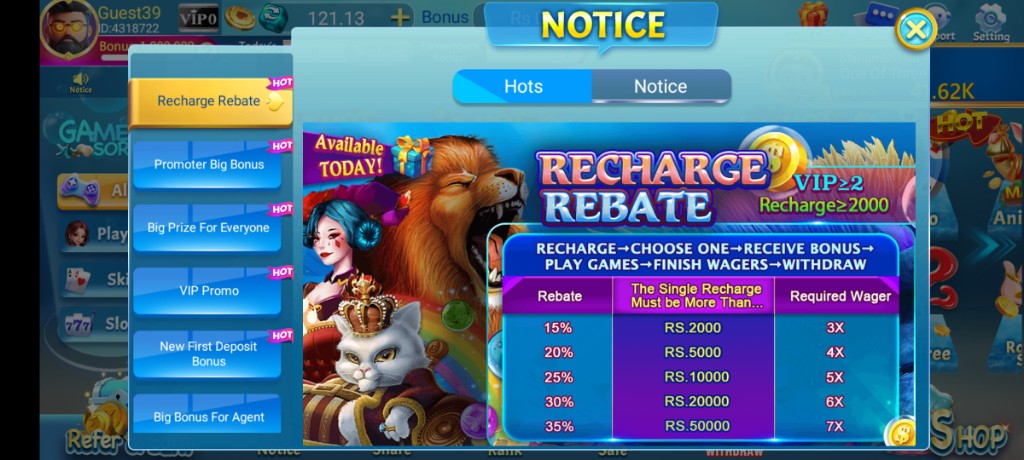
Progression may appear as levels, VIP-style loyalty tiers, missions, or collections. These systems reward continued activity. They should not redefine your self-worth for the week. Climb at the pace of natural play. Paid pressure disguised as progress is still pressure; evaluate it with a cool head.
If progression screens show locked rewards, requirements are usually listed nearby. Screenshot-era assumptions fail here. Current text wins. When a tier feels expensive relative to your fun, stop feeding it.
- Track progress weekly, not minute by minute
- Claim progression rewards promptly
- Ignore strangers selling rank boosts
- Compare time invested with actual enjoyment
- Keep login security tighter as accounts gain history
Social and Chat Features
Chat, emotes, or friend lists appear in many card apps. They can be friendly or noisy. Mute controls are a feature; use them. Never share account codes in chat. Never follow links that demand credentials. Social layers are optional entertainment, not customer support counters.
If you add friends, prefer people you actually know offline when possible. Random friend requests that immediately pitch investments or external payments are red flags. Block early.
- Mute when concentration matters
- Keep personal data out of public chat
- Block promotional harassment quickly
- Use friends lists for real social play, not tip sellers
- Report impersonation if tools exist
Quality-of-Life Details
Quality-of-life features include clearer tables on larger screens, adjustable audio, faster reconnect prompts, and more readable reward text. On budget phones, reducing background clutter may matter more than any cosmetic flair. Performance is a feature you feel even when it is not marketed on a banner.
Language support and readable fonts help mixed-language households. If text is hard to see, adjust system font settings. Misreading a confirmation dialog is how accidental purchases or accidental leaves happen.
| QoL area | Why it matters | Player tip |
|---|---|---|
| Audio toggles | Focus and household peace | Set defaults on day one |
| Reconnect prompts | Tournament survival | Do not spam taps |
| Readable rewards | Honest accounting of bonuses | Verify inbox after claims |
| Lightweight animations | Budget device comfort | Close heavy background apps |
Features to Treat Carefully
Any storefront, recharge, or promotional purchase flow deserves slow reading. Confirm amounts and cancel paths. Any download prompt that jumps outside the app deserves even more skepticism. Features that create urgency with countdown theater still allow you to walk away.
Avoid third-party tools that claim to unlock hidden menus, reveal cards, or automate play. Those are not official features of a healthy install. They are how phones get compromised.
What This Map Excludes on Purpose
This map does not promote private exploit menus or other non-standard control panels advertised by modders. If a YouTube thumbnail promises a hidden domination panel, treat it as a malware funnel until you have strong reasons otherwise — and you usually will not.
Notifications and Reminder Features
Push notifications can remind you about daily claims or events. Used lightly, they help you avoid missing a bonus you already planned to collect. Used heavily, they train compulsive opens. Configure notifications so they serve your schedule instead of inventing new urges every hour.
If your phone is shared, consider disabling promotional pushes entirely. Not every feature needs to reach the lock screen. Quiet defaults are a legitimate preference, not a lack of enthusiasm.
- Allow only the reminder classes you truly want
- Disable noisy marketing pushes if they spike compulsion
- Keep lock screen details minimal on shared devices
- Review notification permission after updates
- Turn off banners during work or study blocks
How to Explore Features in New Builds
When an update lands, spend five minutes in tour mode: open settings, open events, open bonus panels, and open one low-pressure table. Do not enter your longest tournament of the month as the first click after an update. Exploration first, commitment second.
If a feature disappeared, check whether it moved under a new tab before assuming removal. If it truly left, adapt. Apps evolve. Your entertainment plan can evolve without anger.
- Tour the UI after updates
- Read new event rules once
- Test connectivity before long commitments
- Keep expectations tied to entertainment value
- Refuse modded substitutes for missing features
Accessibility and Comfort Settings
Comfort features are easy to overlook: text size, brightness, left or right hand reach on large phones, and audio balance. Adjusting them is part of using the product well. If you cannot read a confirmation dialog, you cannot consent meaningfully to what it asks.
Long sessions benefit from posture breaks more than from any cosmetic lobby flair. Set a gentle timer outside the game if the client does not remind you. Features should not erase your awareness of time.
| Comfort lever | Benefit | Tip |
|---|---|---|
| System font size | Fewer misreads | Test on reward screens |
| Brightness | Less eye strain | Avoid max brightness all night |
| Audio levels | Household peace | Separate SFX and music if available |
| External timer | Session control | Stop when it fires |
Settings You Should Revisit Monthly
A short monthly pass through settings keeps features aligned with your real life. Confirm sound levels still fit your household, check that notification classes still make sense, and verify you still recognize the login method on file. Tiny audits prevent surprise lockouts after long breaks.
If you changed phones recently, revisit data permissions and battery exemptions that older hardware never needed. Feature comfort on a new device is partly configuration, not only raw performance.
Closing Perspective on Features
3 Patti Pearl’s feature set is best understood as layers: account, lobby, core card play, bonuses, progression, social, and quality-of-life. Learn the layers, use the ones that support fun, and ignore unofficial extras that promise control they should not have.
Features exist to structure leisure. When they start structuring stress — endless banner chasing, unsafe downloads, noisy chat — dial them back. The most powerful feature on any phone remains the ability to close the app and keep your evening.
Revisit this mental map whenever the UI shifts. Categories stay useful even when icons change paint. That stability in your head is worth more than memorizing one version’s button coordinates.
Screenshots
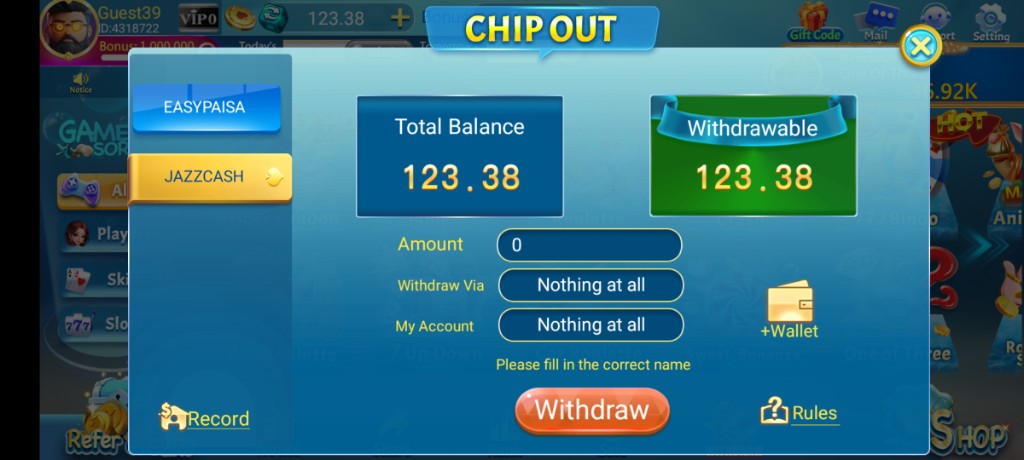
These are real app UI screenshots to make each step easier to follow. Balances and events can change, so always match what you see in your installed version.

Frequently Asked Questions
Which feature should beginners open first?
Lobby basics and daily bonus. Learn gameplay before chasing every event tab.
Does the Shop support local payments?
Many builds show JazzCash and Easypaisa style tabs. Confirm what your version shows.
Is Rank a core feature?
Rank shows competitive standings. It is optional for casual players.
Do features stay identical forever?
Updates and events can change menus and timers.
Where is Support inside the app?
Often near Shop or top lobby icons. See the support page.
Does this site claim private tables?
No. This site does not claim a private-table feature for 3 Patti Pearl.
Conclusion
For a balanced opinion after features, read the review page.
Next step: 3 Patti Pearl Review: Features, Gameplay and Experience.